
The Claude Workflow Template
A reusable system for turning one real task into a repeatable Claude workflow. Everything is fill-in-the-blank: copy the blocks, replace the bracketed text, delete what doesn't apply. The 30-minute setup is most of the improvement.

Alexandr Rich
AI Learning Hub
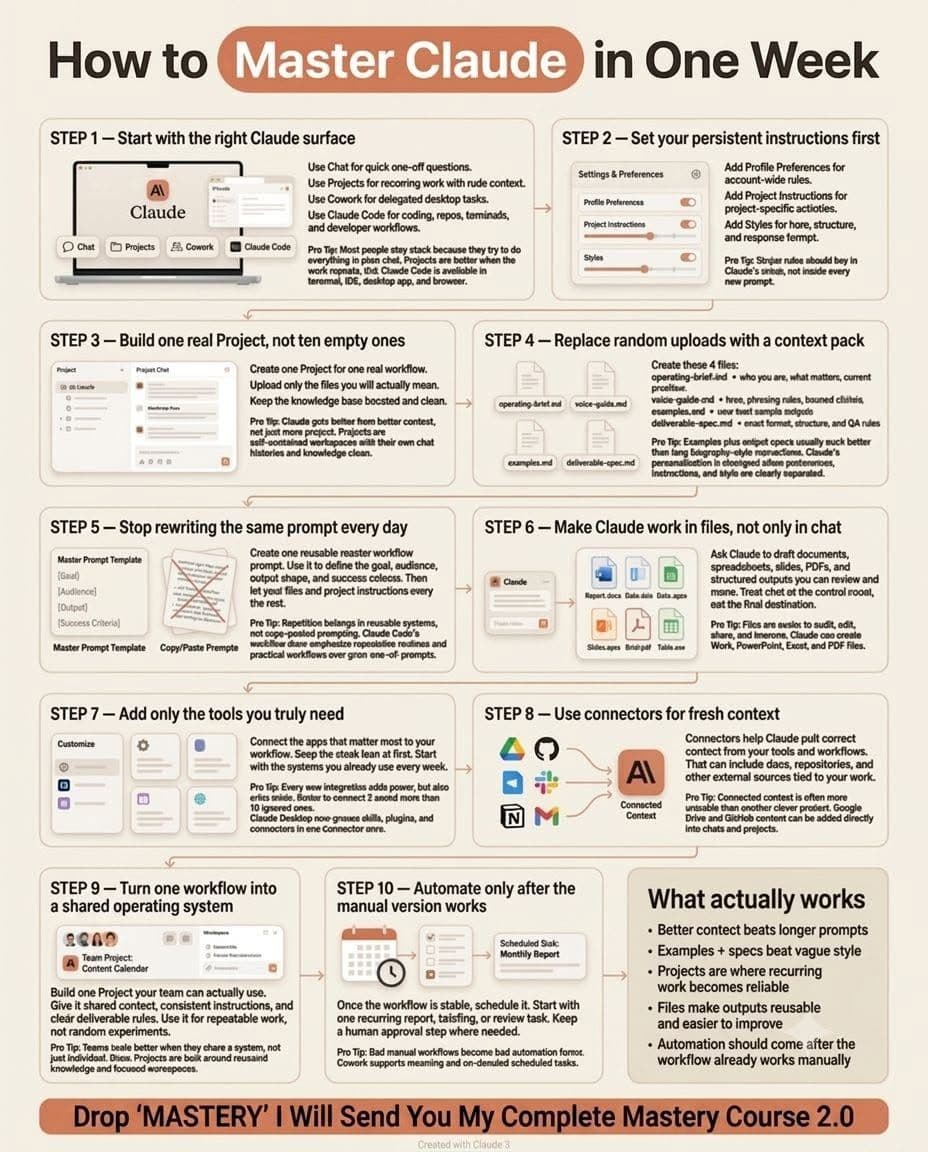
A reusable system for turning one real task into a repeatable Claude workflow.
Everything here is fill-in-the-blank. Copy the blocks, replace the bracketed text, delete what does not apply to you.
Do not try to implement all of it today. Do Part 1 and Part 2 for one task. That alone is most of the improvement.
The 30-Minute Setup
| Step | Time | What you do |
|---|---|---|
| 1 | 5 min | Pick one recurring task (Part 0) |
| 2 | 5 min | Set persistent instructions (Part 1) |
| 3 | 10 min | Write the context pack (Part 2) |
| 4 | 5 min | Save the reusable task prompt (Part 3) |
| 5 | 5 min | Write the definition of done (Part 4) |
Then run it manually three times before you change anything.
Part 0 — Pick the Task
The right first task has four properties:
- You do it at least weekly
- You can tell good output from bad output in under two minutes
- The inputs are things you already have (docs, tickets, transcripts, data)
- Nobody gets hurt if version one is mediocre
Good candidates: writing technical specs, triaging support conversations, drafting requirements for a coding agent, weekly research digests, first-draft PRDs, meeting-notes-to-action-items, competitor monitoring.
Bad first candidates: anything client-facing on the first pass, anything where you cannot articulate what "good" means, anything you do twice a year.
Write it down in one sentence:
The task: [e.g. "Turn a rough feature idea into a build-ready spec for an AI coding agent."]
How often: [e.g. "3–5 times per week."]
How I know it worked: [e.g. "The coding agent completes it without asking me clarifying questions."]
Part 1 — Persistent Instructions
These are the things you should never have to type again. Two layers.
Layer 1: Account-level (Profile Preferences)
This applies to every conversation. Keep it short — it is about how you want to be worked with, not what you work on.
ABOUT ME
I am [role] at [company/context]. I work primarily on [domains].
My technical level: [beginner / intermediate / expert] in [areas].

HOW TO RESPOND
- Lead with the answer, then the reasoning. No preamble.
- If a request is ambiguous in a way that changes the output, ask before producing.
- Flag assumptions explicitly with "ASSUMPTION:" rather than burying them.
- Tell me when I am wrong. Do not soften it into agreement.
- Default length: [short and dense / thorough]. Expand only when I ask.

NEVER
- [e.g. "Do not add disclaimers about being an AI."]
- [e.g. "Do not restate my question back to me."]
- [e.g. "Do not produce placeholder content like 'insert data here' — ask me for the data."]
Layer 2: Project-level (Project Instructions)
This applies inside one project. It is about this work.
ROLE
You are acting as [e.g. "a senior product engineer writing implementation specs"]
for [e.g. "a Shopify app team of 3"].

WHAT THIS PROJECT IS FOR
Every task in this project produces [deliverable type].
The audience for that deliverable is [who reads/uses it].

SOURCES OF TRUTH
- Use the files in project knowledge as authoritative.
- When project knowledge conflicts with your general knowledge, project knowledge wins.
- If the answer is not in project knowledge, say so instead of filling the gap.
- Never invent [numbers / API names / customer quotes / internal terminology].

OUTPUT RULES
- Default format is defined in deliverable-spec.md. Follow it exactly.
- Match the tone in voice-guide.md.
- Before producing the final output, check it against the Definition of Done.

WHEN TO STOP AND ASK
Ask me a question instead of proceeding if:
- A required input is missing or ambiguous
- Two sources in project knowledge contradict each other
- The request would require you to assume [business logic / pricing / user counts / anything I own]
Ask at most 3 questions, batched in one message, then wait.

WHEN TO CONTINUE WITHOUT ASKING
- Formatting choices
- Word-level wording
- Anything covered by examples.md
Why this matters: most "bad Claude output" is actually an under-specified boundary. Half the failures on this list disappear once "when to stop and ask" is written down.
Part 2 — The Context Pack
Four files. Upload them to your project once. Update them when reality changes, not every session.
The point of files instead of a long prompt: files are versionable, reviewable, and shared. A prompt you retype every day is a system you cannot improve.
File 1 — operating-brief.md
# Operating Brief

## Who I am
[Role, company, what you actually ship.]

## What we're building
[2–4 sentences. Plain language, no pitch.]

## Who it's for
[The user. Be specific: "Shopify merchants doing $1M–$20M/yr who handle
support themselves" beats "e-commerce businesses."]

## Current priorities (as of [date])
1. [Priority]
2. [Priority]
3. [Priority]

## Constraints that shape every decision
- Team size / who does what: [ ]
- Tech stack: [ ]
- Budget or time limits: [ ]
- Things we've already decided and won't revisit: [ ]

## Vocabulary
[Internal terms and what they mean. This kills a whole class of errors.]
- [Term] = [definition]
- [Term] = [definition]

## Known traps
[Mistakes you've seen made on this task before.]
- [e.g. "Confusing 'merchant' with 'end customer' — merchants are our users,
  end customers are theirs."]
File 2 — voice-guide.md
# Voice Guide

## Register
[e.g. "Direct, technical, no marketing language. Written for engineers who
skim."]

## Rules
- Sentence length: [ ]
- Person: [first / second / third]
- Jargon: [use freely / define on first use / avoid]
- Formatting: [headers + short paragraphs / bullets / prose]

## Banned phrases
[Be ruthless here. This is the highest-leverage section in the whole pack.]
- "leverage" (as a verb)
- "in today's fast-paced world"
- "it's important to note"
- "delve" / "seamless" / "robust" / "game-changing"
- [add your own]

## Banned patterns
- No em-dash-heavy sentences
- No three-item lists where two would do
- No rhetorical questions as section openers
- No summary paragraph that restates what was just said

## Do this instead
[Before → after pair from your own writing.]
Before: [ ]
After: [ ]
File 3 — examples.md
# Examples

## Example 1 — GOOD
### Input
[The actual request or raw material.]

### Output
[The full deliverable, exactly as you'd want it.]

### Why this is good
- [Specific reason]
- [Specific reason]

---

## Example 2 — GOOD
[Same structure. Aim for 2–3 good examples covering different shapes of input.]

---

## Example 3 — BAD
### Output
[A real weak output. Use a genuine failure, not a strawman.]

### What's wrong with it
- [Specific defect]
- [Specific defect]

### What it should have done instead
[ ]
The 80/20 of this entire pack: two good examples and one annotated bad example outperform three pages of adjectives about tone. If you only build one file, build this one.
File 4 — deliverable-spec.md
# Deliverable Spec

## Format
[Exact structure. Copy your own template in here.]

# [Title]
## Context
## [Section]
## [Section]
## Open questions

## Length
[Target and hard ceiling. e.g. "600–900 words. Never over 1,200."]

## Required elements
- [ ] [e.g. "Every claim about current behavior cites a file or ticket"]
- [ ] [e.g. "Acceptance criteria written as testable statements"]
- [ ] [e.g. "Open questions section, even if empty — write 'None'"]

## Forbidden
- [ ] No placeholder text
- [ ] No invented [metrics / names / quotes]
- [ ] No recommendations without a stated tradeoff

## Quality bar
[One sentence. e.g. "A new engineer could implement this without asking me
anything."]
Part 3 — The Reusable Task Prompt
Save this once. Fill in the top three lines each time. That is the whole daily interaction.
TASK: [what you want done, one sentence]
INPUT: [attached file / pasted text / link — the raw material]
VARIANT: [anything different about this run, or "standard"]

Follow project instructions and the context pack.

Process:
1. Restate the task in one line and list the inputs you're using.
2. Flag anything missing or ambiguous. If it blocks you, stop and ask.
   If it doesn't, state the assumption and continue.
3. Produce the deliverable per deliverable-spec.md.
4. Self-check against the Definition of Done below and report each line
   as PASS / FAIL / N/A. Fix any FAIL before showing me the output.

Output order: self-check results first, then the deliverable.
That last line matters more than it looks. Putting the check before the deliverable means the model evaluates against the standard while it still has room to correct, instead of rationalizing what it already wrote.
Variations worth saving
Refinement pass:
Revise the previous output. Change ONLY: [specific change].
Everything else stays identical. Show me what changed and nothing else.
Critique before produce (for high-stakes work):
Before producing anything: list the 3 ways this deliverable most commonly
fails, and how you'll avoid each. Then produce it.
Two-pass adversarial (for work that ships):
Pass 1: produce the deliverable.
Pass 2: critique it as [the harshest reasonable reviewer — e.g. "the engineer
who has to implement this"]. Find the 3 weakest points.
Pass 3: produce the revised version.
Part 4 — Definition of Done
Paste this into deliverable-spec.md or keep it in the task prompt. Customize the middle section for your task.
DEFINITION OF DONE

Substance
[ ] Every factual claim traces to a provided source, or is explicitly
    labeled as an assumption
[ ] No invented numbers, names, dates, quotes, or API surfaces
[ ] Contradictions between sources are surfaced, not silently resolved
[ ] The actual question asked was answered — not an adjacent easier one

Format
[ ] Matches deliverable-spec.md structure exactly
[ ] Within length limits
[ ] All required elements present
[ ] No placeholder text anywhere

Voice
[ ] No banned phrases or patterns from voice-guide.md
[ ] Consistent with examples.md

Task-specific
[ ] [your criterion]
[ ] [your criterion]
[ ] [your criterion]

Handoff
[ ] Open questions listed (or explicitly "None")
[ ] A person who wasn't in this conversation could use this as-is
The last line is the real test. If the output only makes sense to someone who watched it get made, it is not done.
Part 5 — Human Review Points
Do not review everything. Review the places where failure is expensive and hard to spot.
The four gates
Gate 1 — Input (before the run). Is the raw material complete and current? Most bad output is bad input. 30 seconds.
Gate 2 — Interpretation (after step 1 of the task prompt). Read only the restatement and the assumptions. If the task was misunderstood, you catch it here for free instead of after a full deliverable. 15 seconds.
Gate 3 — Substance (after the deliverable). Ignore prose quality entirely. Check only: are the facts real, is the logic sound, are the assumptions acceptable. 2 minutes.
Gate 4 — Release (before it leaves your hands). Format, voice, and "would I put my name on this." 1 minute.
Failure modes and where to fix them
| What you see | Real cause | Fix it in |
|---|---|---|
| Confidently wrong facts | No source-of-truth rule | Project instructions |
| Right format, empty substance | Spec describes shape, not quality bar | deliverable-spec.md |
| Generic corporate tone | No banned list, no examples | voice-guide.md + examples.md |
| Barrels ahead on ambiguity | No stop condition | "When to stop and ask" |
| Asks about trivia | Stop condition too broad | Narrow it, add "continue without asking" list |
| Uses stale information | Context pack out of date | The files themselves |
| Drifts over a long chat | Too much accumulated context | New chat, same project |
| Inconsistent run to run | Prompt is being retyped | Use the saved task prompt verbatim |
Keep a running log for the first two weeks: date, what went wrong, which file you changed. That log is the workflow design process. After ten entries you will have a system that fits your work better than any template a stranger wrote — including this one.
Part 6 — The Automation Gate
Do not automate until all five are true:
- You have run it manually at least 10 times
- The last 5 runs needed no substantive correction — formatting nits do not count
- You can name every failure mode you have seen and each one has a fix in place
- You know exactly what "wrong" output looks like, so you would catch it in a batch
- There is a human approval step before anything is sent, published, merged, or paid
Then automate in this order:
Connectors → tools → scheduling → multi-step chains
Add one at a time. Run for a week. Adding three at once means you cannot tell which one broke it.
Automation does not repair a weak workflow. It repeats it faster, and it removes the person who would have noticed.
Part 7 — Worked Example
Short version of what this looks like filled in, for "turn a rough feature idea into a build-ready spec."
Task: rough idea → spec an AI coding agent can implement without questions.
Project instructions (excerpt):
Sources of truth: the codebase map and the API reference in project knowledge.
Never invent endpoint names, table names, or existing function signatures —
if you need one and cannot find it, ask. Stop and ask if the feature touches
billing, auth, or data deletion.
operating-brief.md (excerpt):
Vocabulary: "merchant" = our paying customer. "customer" = the merchant's
shopper. "agent" = our AI support agent, never a person.
Known trap: specs that say "add a setting" without saying where in the
settings hierarchy it lives.
deliverable-spec.md (excerpt):
Required: user story, acceptance criteria as testable statements, affected
files with paths, data model changes, edge cases, rollback plan, open
questions.
Quality bar: a coding agent completes it with zero clarifying questions.
Daily use:
TASK: spec the bulk-tagging feature
INPUT: [pasted Slack thread]
VARIANT: standard
What broke in week one: it invented three plausible-looking function names. Fix: the "never invent" line went into project instructions. Did not happen again.
One-Page Quick Reference
SETUP (once per workflow)
  Profile preferences ....... how you want to be worked with
  Project instructions ...... role, sources of truth, output rules,
                              when to stop and ask
  operating-brief.md ........ who, what, constraints, vocabulary, traps
  voice-guide.md ............ register, rules, banned phrases
  examples.md ............... 2 good + 1 annotated bad
  deliverable-spec.md ....... exact format, length, required, forbidden

DAILY (30 seconds)
  TASK / INPUT / VARIANT → run saved prompt → review 4 gates

IMPROVE (weekly)
  Log every failure → identify which file should have prevented it
  → change that file → never patch it in the chat

AUTOMATE (after 10 clean manual runs)
  Connectors → tools → scheduling → chains. One at a time.
  Human approval before anything ships.
What Actually Moves the Needle
If you do nothing else from this document:
- Write the "when to stop and ask" rule. Biggest single-line improvement available.
- Add two good examples and one bad one. Beats any amount of describing.
- Make the model self-check before it shows you the output.
- Keep the failure log for two weeks.
Everything else is refinement.
Resources & links
Go deeper on the ideas behind this template:
- Context Engineering — the skill behind the context pack: controlling exactly what the model sees.
- grill-me — make the agent interview you before it produces anything; the "stop and ask" idea as a standalone skill.
- Superpowers — the full spec-driven methodology, if you want the heavyweight version of Part 7.
- Karpathy guidelines — the minimal behavioral ruleset that pairs well with Layer 1 instructions.
- Spec-Driven Development With AI Agents — the complete idea-to-reviewed-code workflow.
- Prompt Engineering in 2026 — why the reusable task prompt is structured the way it is.
- Agentic Automation track — every guide and downloadable skill on this topic.
Download the skills from this guide
Put the ideas above into practice — grab these ready-to-run agent skills.

Superpowers: The Spec-Driven Skill That Owns Your Whole Build
The most-starred agent skill on GitHub. Superpowers stops your agent from rushing in, works a spec out of the conversation, and hands a reviewed plan to subagents that build and check each other's work.
GStack: Give Your Agent a Whole Software Team's Worth of Roles
Garry Tan's Claude Code setup, ~110k stars. Instead of one mode, GStack gives your agent distinct roles — product vision, designer, engineering manager, QA, release manager — each behind its own slash command.
GSD Core: Ship Without Context Rot Using Atomic Plans
Git. Ship. Done. A spec-driven system that fights context rot by breaking work into atomic plans that run in fresh context windows, keeping your main session light while subagents do the heavy lifting.